讀取 pcd 檔並顯示三維影像
發表於
Point Cloud Libraries (PCL) 是一個非常強大的三維空間點雲處理函式庫。 如果說到二維影像處理,就會想到 OpenCV 的話,那說到三維點雲處理,就一定會想到 pcl。
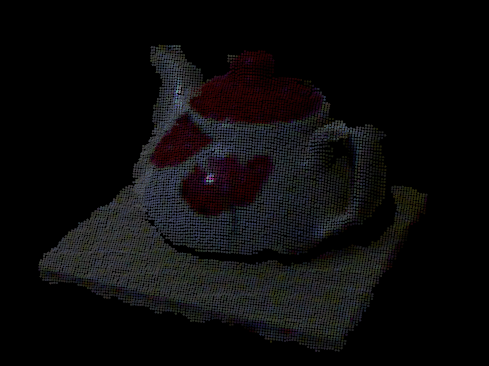
在 pcl 中,提供一種名為 *.pcd 格式的檔案,以供儲存點雲數據,這一類的檔案,網路 上隨手可得,那要如何打開 pcd 格式的檔案呢? 設定好 pcl 的開發環境後, 我們可以透過以下簡易程式來打開 pcd 數據。
#include <iostream>
#include <pcl/io/io.h>
#include <pcl/io/pcd_io.h>
#include <pcl/visualization/cloud_viewer.h>

// typedef pcl::PointXYZ PointT;
typedef pcl::PointXYZRGBA PointT;

void viewerOneOff (pcl::visualization::PCLVisualizer& viewer)
{
    // set background to black (R = 0, G = 0, B = 0)
    viewer.setBackgroundColor (0, 0, 0);
}

void viewerPsycho (pcl::visualization::PCLVisualizer& viewer)
{
    // you can add something here, ex:  add text in viewer
}

int main (int argc, char *argv[])
{
    pcl::PointCloud<PointT>::Ptr cloud (new pcl::PointCloud<PointT>);

    // Load .pcd file from argv[1]
    int ret = pcl::io::loadPCDFile (argv[1], *cloud);
    if (ret < 0) {
        PCL_ERROR("Couldn't read file %s\n", argv[1]);
        return -1;
    }

    pcl::visualization::CloudViewer viewer("Cloud Viewer");

    // blocks until the cloud is actually rendered
    viewer.showCloud(cloud);

    // use the following functions to get access to the underlying more advanced/powerful
    // PCLVisualizer

    // This will only get called once
    viewer.runOnVisualizationThreadOnce (viewerOneOff);

    // This will get called once per visualization iteration
    viewer.runOnVisualizationThread (viewerPsycho);
    while (!viewer.wasStopped ()) {
        // you can also do cool processing here
        // FIXME: Note that this is running in a separate thread from viewerPsycho
        // and you should guard against race conditions yourself...
    }

    return 0;
}
要編譯這個程式,最簡單的方式就是使用 CMake, 你可以設定 CMakeLists.txt 檔案如下
cmake_minimum_required(VERSION 2.8 FATAL_ERROR)

project(cloud_viewer)

find_package(PCL 1.2 REQUIRED)

include_directories(${PCL_INCLUDE_DIRS})
link_directories(${PCL_LIBRARY_DIRS})
add_definitions(${PCL_DEFINITIONS})

add_executable (cloud_viewer cloud_viewer.cpp)
target_link_libraries (cloud_viewer ${PCL_LIBRARIES})
你可以下載 teacup.pcd 來進行測試,顯示出來的情況如下圖: