使用 newlisp 寫 GTK 的 Hello World!!
發表於
newlisp 是另外一個我很喜歡的 lisp 方言,他的語法比較接近 Scheme,適合做 為腳本語言,此外,由於他的程式體積非常輕巧,只有大約 300k 的大小,因此 做出來的執行檔也比較小。本文將透過 GTK 版的 Hello World 來展示使用 newlisp 的 FFI (Foreign Function Interface) 來建立 GTK 的視窗。
程式截圖
由於我們要用 C 語言與 newlisp 寫同樣的東西,先來看看最後結果會長怎樣。
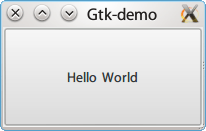
C 語言版本
這整個 newlisp 程式是依樣畫葫蘆從 C 語言版本轉換過去,我們先來看看 C 語言 的版本。
/*
 * Compile command:
 *       gcc hello.c -o hello `pkg-config --libs --cflags gtk+-2.0`
 */

#include <gtk/gtk.h>

int main(int argc, char *argv[])
{
    GtkWidget *window;
    GtkWidget *button;

    gtk_init (&argc, &argv);

    /* Create the main, top level, window */
    window = gtk_window_new (GTK_WINDOW_TOPLEVEL);

    /* Give window title */
    gtk_window_set_title (GTK_WINDOW (window), "Gtk-demo");

    /* Setup default window size */
    gtk_widget_set_size_request (GTK_WINDOW (window), 200,100);

    /* Connect the destroy signal of the window to gtk_main_quit
     * When the window is about to be destroyd we get a notification
     * and stop the main GTK+ loop.
     */
    g_signal_connect (window, "destroy", G_CALLBACK (gtk_main_quit), NULL);

    /* Create the "Hello World" button */
    button = gtk_button_new_with_label ("Hello World");

    /* Insert button into the main window */
    gtk_container_add (GTK_CONTAINER (window), button);

    /* Make sure that everything, window and button, are visible. */
    gtk_widget_show_all (window);

    /* Start the main loop, and let it reset there until the
     * application is closed. */
    gtk_main ();

    return 0;
}
newlisp 版本
由於並沒有 newlisp 版本的 GTK wrapper,因此我們必須透過 lisp 的 FFI 功能 (Foreign Function Interface,相當於 C 語言的 dlopen 功能)來呼叫 GTK 的 function。
首先先從 libraries 裏面載入需要的 function,接著就可以和寫 C 語言版本的 hello world 一樣,直接使用這些 function 來產生我們需要的 gtk 圖形介面了。
#!/usr/bin/env newlisp

;; Predefine libraries for Linux platform
(set 'GTK     "libgtk-x11-2.0.so.0")
(set 'GOBJECT "libgobject-2.0.so.0")

;; Get functions from libraries
(import GOBJECT "g_signal_connect_data")
(import GTK     "gtk_init")
(import GTK     "gtk_main")
(import GTK     "gtk_exit")
(import GTK     "gtk_widget_show_all")
(import GTK     "gtk_window_new")
(import GTK     "gtk_window_set_title")
(import GTK     "gtk_widget_set_size_request")
(import GTK     "gtk_button_new_with_label")
(import GTK     "gtk_container_add")
(import GTK     "gtk_main")

;; callback to exit program
(define (_exit_) (gtk_exit 0) (exit))

;; initial gtk
(gtk_init 0 0)

;; Create the main, top level, window
(set 'WINDOW (gtk_window_new 0))

;; Give window title
(gtk_window_set_title WINDOW "Gtk-demo")

;; Setup default window size
(gtk_widget_set_size_request WINDOW 200 100)

;; Connect the destroy signal of the window to gtk_main_quit
;; When the window is about to be destroyd we get a notification
;; and stop the main GTK+ loop.
(g_signal_connect_data WINDOW "delete-event" (callback 0 '_exit_) 0 0 0)

;; Create the "Hello World" button
(set 'button (gtk_button_new_with_label "Hello World"))

;; Insert button into the main window
(gtk_container_add WINDOW button)

;; Make sure that everything, window and button, are visible.
(gtk_widget_show_all WINDOW)

;; Start the main loop, and let it reset there until the
;; application is closed.
(gtk_main)

;; After all done, exit newlisp environment
(_exit_)